
Helpdesk Support: Applicant Tracking System (ATS)

Manage ATS
The Manage ATS section provides a complete view of job postings and candidate progress.You can see details such as:
-
Job Publish Date, Job Posting, Positions, Applicants, Shortlisted ,Selected
A filter is available to search by Job Title, and the total number of applicants is shown at the top right.
In the Applicants column, the number indicates how many job posts a candidate has applied for.
-
Click on the number to view those applications and take action—shortlist or select the candidate as needed.
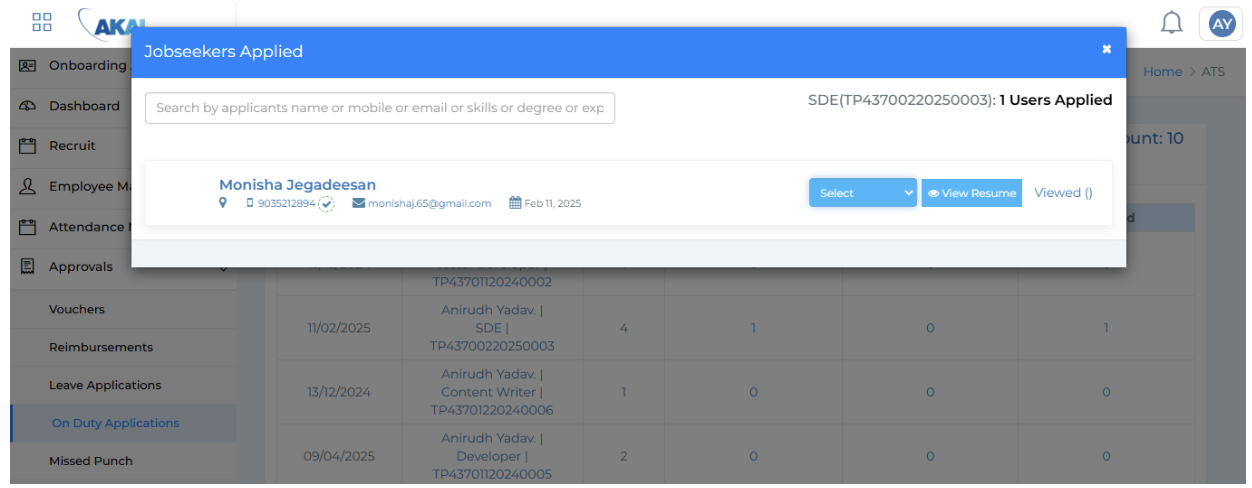
Once shortlisted, the count is updated under the Shortlisted column.
-
Click here to view the resume and either select or reject the candidate.

Candidates who are selected appear under the Selected column.
-
Click the number to send an offer letter or reject if required