
General Settings
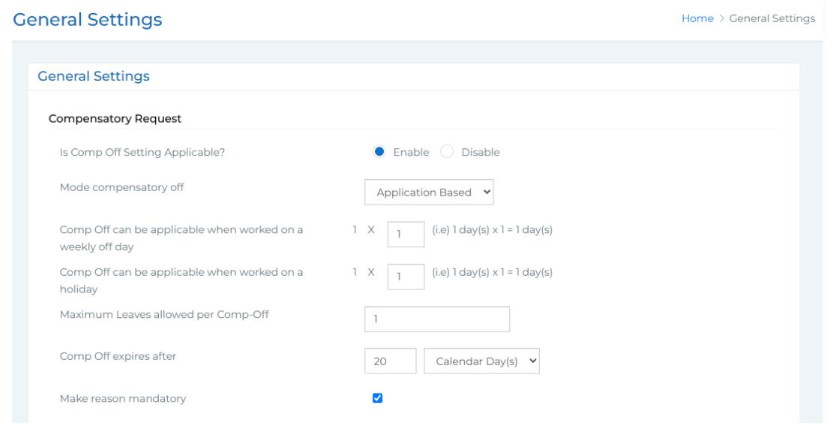 In this section, you can configure important organization-wide settings related to leave and attendance management. The available options include:
● Compensatory Off Request Settings:
○ Enable or disable compensatory off request functionality.
○ Choose the mode of compensatory off (e.g., Monthly).
○ If the monthly mode is selected, you can specify the maximum number of comp- offs allowed per month. Define whether comp-offs can be applied for all holidays or specific days only. You also have the option to make the reason field mandatory for comp-off requests.
○ When you select the Application Mode, you can define the following settings for Comp Off: You need to specify the number of Comp Offs that can be applied when an employee works on a weekly off day and when an employee works on a holiday.Then you need to set the maximum number of leaves allowed per Comp Off. You can define the expiry period for a Comp Off after it is credited. You can make it mandatory for employees to provide a reason while applying for a Comp Off.
● LOP (Loss of Pay) Report Settings:
○ Choose whether unpaid leaves should be treated as Loss of Pay.
○ Set the maximum LOP count allowed per year.
● Leave Request Settings:
○ Configure the look-back period for leave requests (e.g., allow requests for up to 1, 2, or 3 years in the past).
● Leave Cancellation Settings:
○ Decide whether providing a reason for leave cancellation should be mandatory. Once all preferences are configured, click Submit to save your settings.